Running a league
A league is a series of rounds through a season: each round has its own date, its own start and its own results, and the points add up to the overall standings. This guide follows a season from the wizard to next year.
The league in one wizard
In the club panel (race-hub.org/en/organizer) open New league → New league with rounds. The wizard has six steps:
- League — the name, the season start and the scoring: points per position, how many best rounds count and a bonus for appearances.
- Paths — length in metres and elevation gain. Put courses that set off at different times in different starts: each gets a start button of its own.
- Categories — ready-made presets or your own, by sex and birth year. Every category belongs to one course, because runners of the short and the long course are never ranked together.
- Rounds — a date generator, or by hand. Every round gets its own date, its own list of competitors and its own results.
- Timekeepers — accounts for volunteers who time the finish, if you need any.
- Review — everything in one place. Nothing is saved until you click Create the league and all rounds.
- The league and all its rounds wait for our approval (Awaiting approval) before they go public — usually the same day.
- Everything from the wizard can be changed later on the league's tabs (step 2), so it need not be perfect first time.

The league's screen
Details next to the league in the panel opens its screen. Everything about the league is on its tabs:
- Rounds — each round's buttons for round day: Competitors, Results, Timing and Edit.
- Schedule — every round's name and date in one form. New rounds are added here, and a round already run cannot be deleted.
- Basics and Scoring — the league's name, start, signup deadline and description; points per position, the number of best rounds and the appearance bonus.
- Courses, Categories and Timekeepers — the same as in the wizard, and editable all season.


Entries for the season
A competitor enters the league once, for the whole season, and wears the same start number in every round. Open the list with Competitors on any round.
- Appearances are still per round: on round day click Start on the row of everyone who turned up. Whoever does not come has no result in that round — not a DNF, and nothing lost.
- A competitor who paid for the whole season (All rounds in the Paid column) needs no start: crossing the finish counts as their appearance.
- Enter a walk-up with New entry on the round you are at: they are entered in the league for the whole season, and with a start number and Paid ticked they are started in that round straight away. Someone who has run your league before need not be retyped: Add from a past season fills in the entry from their old start number.
- Signup changes records every change: who changed what, and when — including fixes the competitor made themselves, through the link in their e-mail.

Round day
Timing happens in the Timekeeping app: the Timing button on a round opens it in a new tab, and on a phone it is right at race-hub.org/timing. You are signed in as the club, so no separate account is needed.
- If there is only one round today, the app opens straight into it. Otherwise today's round is at the top of the list, with the league's name next to it, so rounds of two leagues on the same day cannot be mixed up.
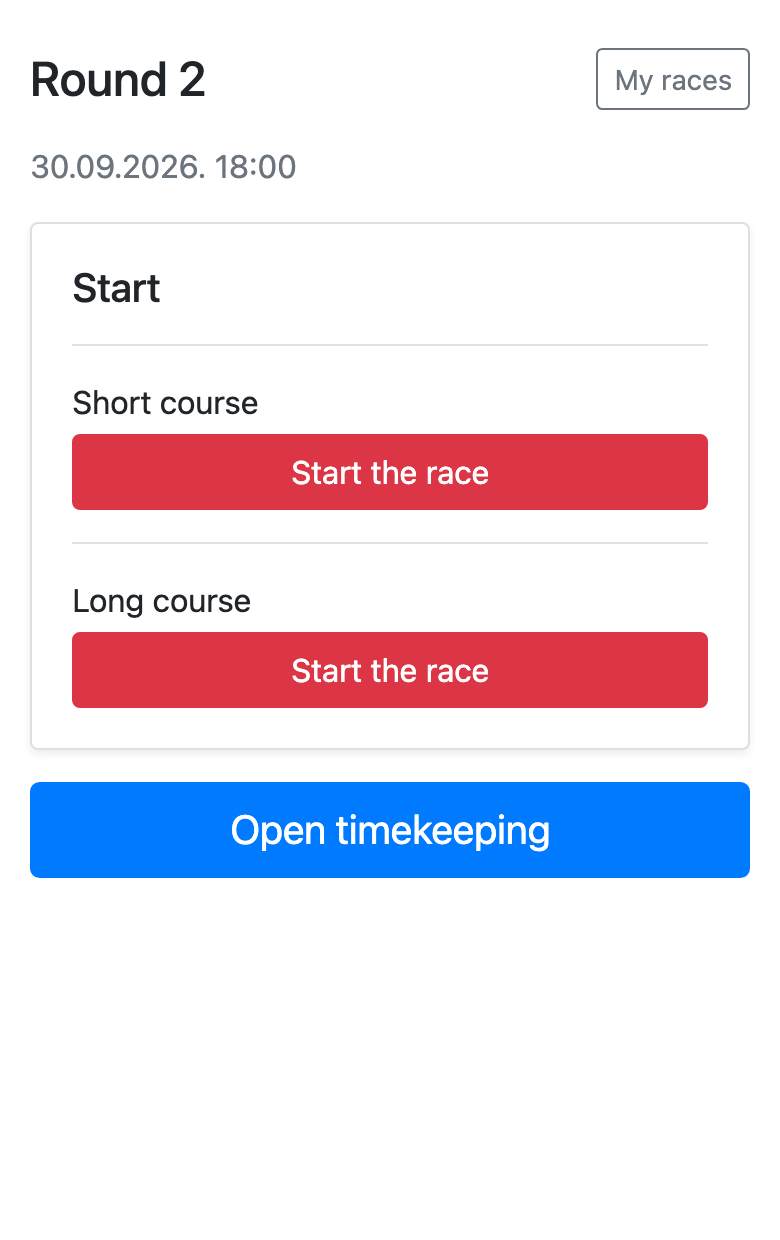
- When a course sets off, click Start the race next to it: courses in different starts each have their own button, so the short and the long course are each started at their own time.
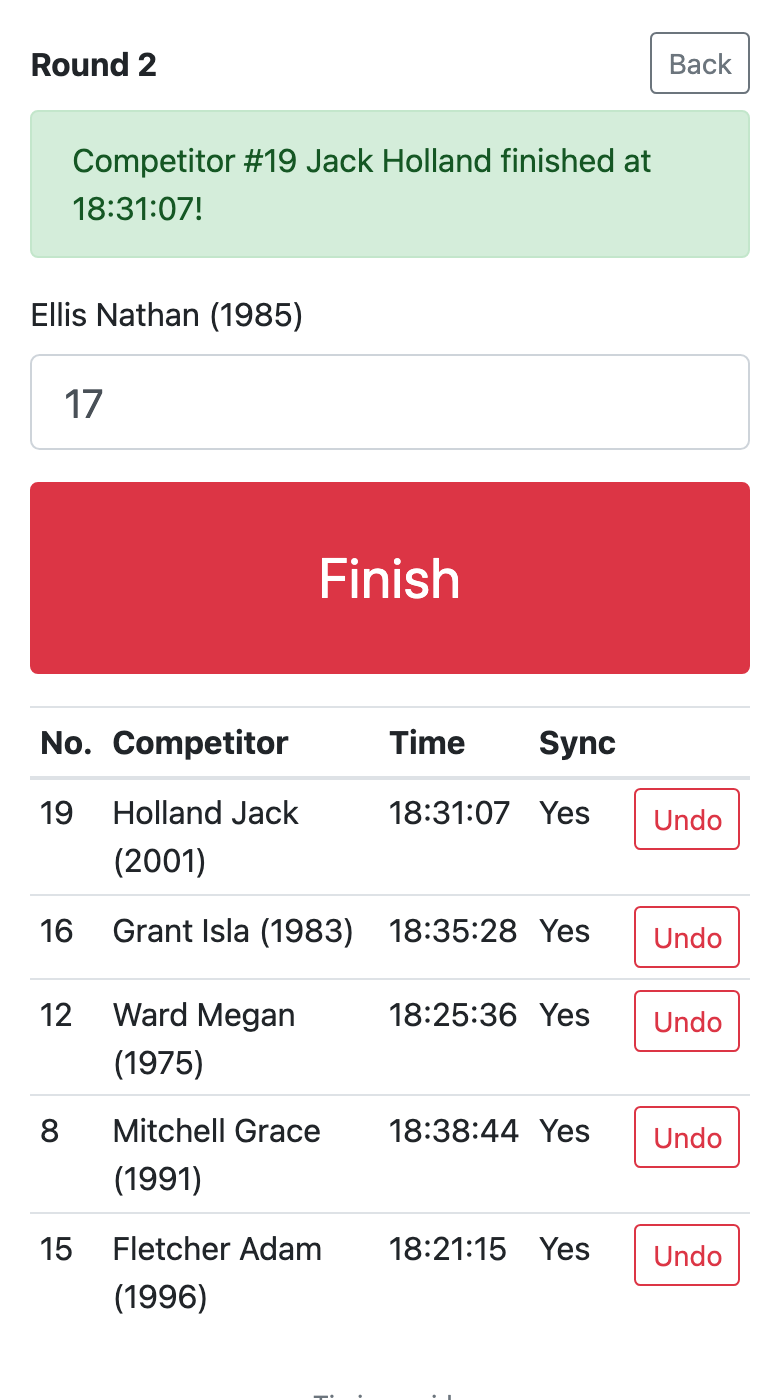
- Open Open timekeeping, type the start number of the competitor crossing the line and press Finish. The name for that number appears above the field as you type, so a wrong number shows before you confirm.
- Give the volunteer at the finish an account on the Timekeepers tab: they sign in with their own username, see only your rounds and never need the club's password.
- Undo a wrong entry with Undo in the table below.
- Fix a start given by mistake with Undo start on the round's screen and start it again when it is time.
- Nothing is lost without signal: entries are kept on the phone and sent as soon as the connection is back — the Sync column shows whether an entry has arrived.
Points and standings
A round's Results tab shows everyone who started or crossed the finish, with a status of Finished, In race, DNF, DNS or DSQ; click a status to change it. A time with * means the competitor crossed the finish with no entry recorded: it counts for neither the ranking nor the points until you click Confirm entry. The points come about like this:
- Close the race — once the round's last runner is in: whoever started and did not finish becomes DNF, and the round is scored straight away.
- Calculate points — after any correction to a result. A new calculation replaces the previous one, so click it as often as you need.
- The league's public standings add the points up round by round, per category; Details on a row shows a competitor's points in every round.
- You can correct a time two ways: type the exact clock time of arrival in Finished at, or the total time in Time. Click Calculate points after the correction.


Next season
Next year's edition of the same league is not typed in again. New season on the league's screen, or New league → From a previous season in the panel, opens the wizard filled in from last season:
- Courses, starts, categories, scoring and timekeepers are carried over as they are.
- Category birth years and the year in the league's name move on by one, so an M40 category stays M40.
- Rounds are not copied — their dates are what makes it a new season. The wizard takes only their number and spacing.
- Nothing is saved until you click Create the league and all rounds, so you can check and correct everything.

Leagues and scoring
Results and ranking
Need help?
Get in touch and we will gladly help you set up your league.